Training your team should not feel like a second job
TutEasy brings course building, scheduling and reporting into one place, so a five-person team and a five-hundred-person business can both run training that people actually finish.
Whoever runs training at your business, we built this for you
You do not need a dedicated L&D department to make TutEasy work. Whether one person wears every hat or you have a full training team, everyone gets what they need from the same platform.
Build once, use everywhere
Put a course together and reuse it across every team, so nobody is rebuilding the same induction from scratch.
Run sessions without the admin
Schedule classes, mark evaluations and pull a report in minutes, no spreadsheet juggling required.

Training that feels worth finishing
Progress bars, badges and certificates turn training into something people want to complete, not just tick off.
We are building AI-assisted course authoring and smart content recommendations. We will let you know the moment they land.
Everything you need to run training well, nothing you don't
From your first course to your fiftieth, TutEasy covers the whole journey.

Course and class builder
Put together courses with lessons, batches and difficulty levels, then schedule classes and watch completion roll in, all from one screen.

Digital quiz and question bank
Write your questions once, build them into quizzes, and reuse them across as many courses as you like.

Gamification
Badges, stamps and certificates, all carrying your own branding, give employees a reason to keep going.

Reports and research tools
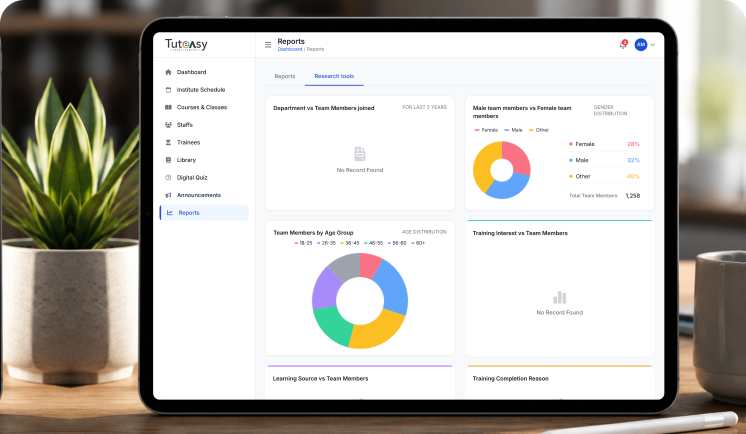
Twelve ready-made reports cover attendance, progress and performance, plus dashboards that show you the bigger picture across your business.

Staff and role management
Give people exactly the access they need with Master, Teacher or Manager roles, so nobody is guessing who can do what.

Multi-tenancy and content sharing
Share content across every team, or keep departments separate, with one simple setting.
Run your training operation from a single screen
Whether you are managing one location or several, you get one dashboard that shows you what is happening right now.

Manage your corporate training from one connected platform. TutEasy helps training teams monitor learning activity, schedule classes, configure company training requirements and communicate important updates to employees.

From day to day course administration to organisation-wide announcements, the platform gives administrators clearer visibility and better control without relying on disconnected tools or manual processes.
01

Dashboard and analytics
See today's active courses, total classes and how things are trending, broken down by course, without digging through reports to find it.
02

Scheduling
Plan your classes by day or month, search by lesson, trainer or course, and add a new session in a couple of clicks.
03

Getting Set up
A short onboarding checklist walks you through your company details, holidays, classrooms and rules, so you go live properly the first time.
04

Announcement
Send a quick update, a course-specific note or something urgent to your whole team, straight from the platform.
Bring your training operations, schedules and communication together in one place.
Book a DemoTraining your people will actually want to open
Employees get their own personalised, branded view of their training, not a generic portal that feels bolted on.

Everything in one view
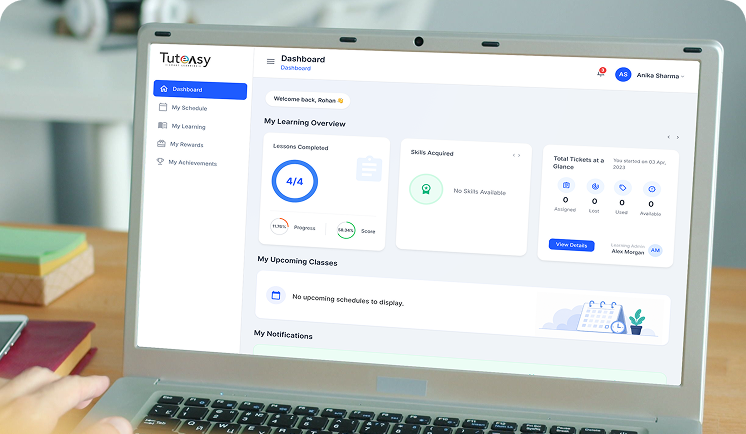
Employees see their courses, progress and scores at a glance, plus what is coming up next.

A clear path through every course
Section by section, with a quick knowledge check along the way and an easy way to pick up where they left off.

Help, without a separate email chain
Stuck on something? Employees can raise a ticket without leaving the course

Something to show for it
Badges and certificates collect in one place, giving employees something to show for the training they have put in.

Everything in one view
Employees see their courses, progress and scores at a glance, plus what is coming up next.
- Progress ring
- Score ring
- Skills acquired
- Ticket summary
- Upcoming classes
- Notifications
The dashboard pulls every enrolled course into one welcome screen, each with a progress ring and a score ring so employees know exactly where they stand.
A skills carousel shows what they have picked up so far and a ticket summary keeps track of support requests raised, resolved or still open.
Upcoming classes and notifications sit on the same screen, so nobody needs to go hunting for what happens next.

A clear path through every course
Section by section, with a quick knowledge check along the way and an easy way to pick up where they left off.
- Section outline
- Knowledge checks
- Last visited marker
- Next navigation
- Completion checkmarks
Every course opens to a left-hand outline of sections and topics, with a checkmark against anything already finished and a marker showing exactly where an employee left off last time.
Each section ends with a short knowledge check, so understanding gets tested along the way rather than only at the end. A single Next button carries learners through the course without them needing to work out what comes after.

Help, without a separate email chain
Stuck on something? Employees can raise a ticket without leaving the course
- Raise a ticket
- Course-scoped
- Status tracking
- Dashboard summary
If an employee gets stuck, they raise a ticket from inside the course itself rather than sending an email into the void.
Each ticket stays attached to the course it came from, so context never gets lost, and the status rolls straight up to their dashboard, where assigned, used and available tickets are all visible at a glance.

Something to show for it
Badges and certificates collect in one place, giving employees something to show for the training they have put in.
- Badges earned
- Certificates
- Unlockable rewards
- Sort and search
Badges collected along the way and certificates for finished courses sit together under My Achievements, so employees have one place to see what they have earned.
A separate Rewards tab holds unlockable content tied to specific milestones, with sort and search so a growing list stays easy to find your way around.
A plan that fits your team, not the other way round
Every business trains differently, so we build your plan around your team size and how you want to roll it out, rather than squeezing you into a fixed price list. Tell us a bit about your business and we will put a plan together with you.
Get Your PlanBuilt by Collatzinc, for teams of every size

Built by Collatzinc, for teams of every size
TutEasy is corporate training software built by Collatzinc Private Limited. It brings course building, scheduling, evaluation and reporting together in one platform, with a separate branded experience for the employees completing that training.
We built TutEasy to work just as well for a small team running its first structured onboarding as it does for a medium-sized business managing training across several departments. Content can be built once and shared everywhere, or kept local to a single team, depending on how your business works.
A Collatzinc product. Learn more at collatzinc.com
Let's talk
Tell us a little about your team and we will get back to you within one business day.
A Collatzinc product